VX++ Cross-Platform
Configuration C++ Source Library 2024
20 years of
development and accumulation, 100% written in C++, 100% open source, 100%
independent and controllable!
Welcome to the
wonderful world of UCanCode VX++!
VX++ is an open source graphics
visualization system. The project was born in May 2004 and released in June of
the same year. We've worked hard to make UCanCode software available to anyone
with access to a personal computer. VX++ for QT currently runs on most Unix
platforms, Windows and macOS. VX++ for QT is developed using the Qt toolkit
(https://www.qt.io) and C++. This means that VX++ feels snappy and has a
pleasant, easy-to-use graphical user interface (GUI).

Supported Environments:
- Windows / Linux / Unix
- Desktop / Web / Mobile
- HTML5 & JavaScript
- Cross-Platform C/C++
- Embedded / ARM
- Java
- C# / VB.NET
- ASP.NET / JSP
No matter what computer software we
develop, computer graphics visualization is essential. In the past, before VX++,
we could only build by ourselves or we could find some isolated code snippets
about visualization on the Internet, but these code snippets had to be
integrated by ourselves, and the quality could not be guaranteed. This provides
great difficulty in developing various computer visualizations.
Now UCanCode VX++ is born, through a
complete set of core C++ framework, you can get a complete set of solutions for
computer graphics visualization, including drawing, layout, exporting as image
or svg, file saving, printing, scripting, animation, expression Operations,
Designers and Runners and more. You will have a complete IDE where you can do
anything by customizing the source code we provide. Such as building simulation
platform, configuration platform, industrial control, reporting platform,
numerical control design software, CAD, business process and so on.
It can greatly save your development time
and ensure that your application becomes professional and stable as much as
possible.
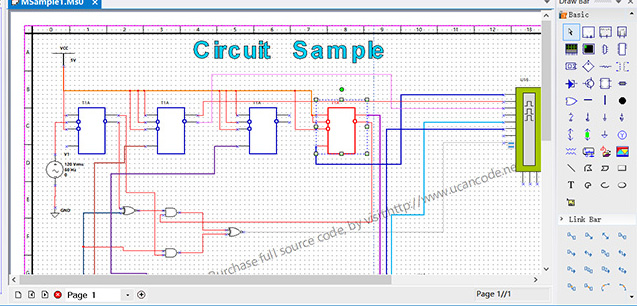
Open source is our purpose
UCanCode Universal Industrial C++ Graphical Visualization Infrastructure Library
-- is a set of industrial-grade graphics C++ basic library developed on PC. This
library provides a professional graphics editor, supports advanced drawing
functions similar to Microsoft Visio, and supports customization Elements,
custom element attributes, script control, SVG import and export, DXF export,
web page output, flowchart layout, printing and print preview, etc., extensive
and advanced industrial-level graphic visualization. It is the best choice for
developing any cross-platform application of simulation, modeling, flowchart,
etc. With VX++, you don't need to care about complex graphic editing and
interactive operations, and you don't need to care about the visual editing of
the interface. A large number of mature and professional source codes are 100%
provided, and you only need to customize them according to your needs.
VX++ runs
on Windows 98/2000/NT/XP/Wom7/Win8/Win10/Linux/Unix/Andriod/Web Chinese
operating system platform, with full Chinese interface. In the process of
product development and design, the international advanced industrial drawing
concept is adopted, the outstanding achievements of the current advanced
industrial software at home and abroad are absorbed, and it has undergone strict
experimental tests and field practices in many industries. Building
a professional modeling and simulation
platform\process\circuit is a very complex system engineering. Using VX++ to
visualize the source code component library will save you more than 90% of the
development time. In order to show how to complete this work more clearly, we
The original solution is specially expanded in detail, and a professional
component library is provided, with more than 3000 kinds of graphic components.
It is an indispensable basic C++ library for developing domestic alternative
industrial software.
The source code is 100% provided, allowing you to master the bottom-level and
core technologies, and 100% avoid being controlled by others.
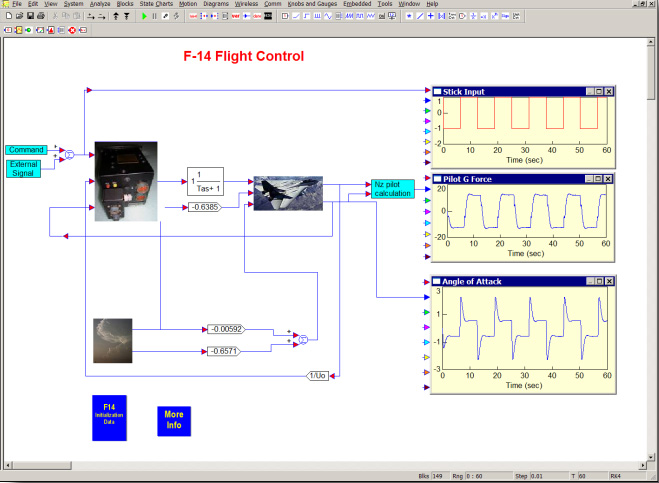 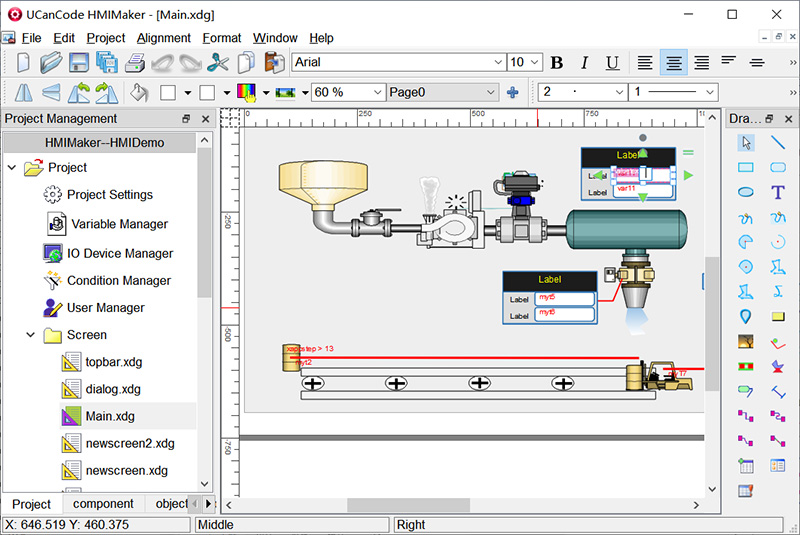
More
about VX++ HMI & SCADA, click here!
Purchase VX++ Complete Source Code.

-- Based On
E-XD++ Data Visualization Library Enterprise Suite
| Product
Information:
"The
only Flow/Diagramming Kits that provides
full source code of components for MFC and
ActiveX in a single package!"
|
UCanCode ActiveX Controls is a graphics engine-library that can be used
from developers in order to visualize their applications. With the
functionality provided, our customers can easily create, edit, manage,
export, import and print 2d vector graphics drawings - graphic files. All
the complete source codes of these ActiveX Controls can be purchased
with E-XD++ Enterprise Suite. The library also supports for
import-export several vector and raster formats including native DXF,
XML and SVG export.
UCanCode Software 's
main goal is to provide our clients an easy way to add to their applications
graphics that make the interface more friendly.
UCanCode
ActiveX Controls (UCCDraw, UCCDiagra, UCCPrint,
UCCCAD) ships with FULL source code!
UCanCode ActiveX
Control ships with the following four ocx controls:
1.
UCanCode
Draw OCX
Control -- designed for visio like flow diagramming drawing.
2.
UCanCode
Diagram OCX
Control -- designed for flow diagramming drawing with a full GUI
feature, it is the same with UCanCode Draw Control, but it supports Electric
Form feature and with advance printing, it also has a GUI showing.
3.
UCanCode Print OCX Control -- designed for database print and label
design and printing.
4.
UCanCode
CAD OCX Control
-- designed for CAD Drawing and Printing.
Note:
UCCDraw ActiveX Control
with UCCDiagram ActiveX Control difference mainly in the interface, UCCDraw only
provides a canvas and a component for graphical display and editing tool box,
and UCCDiagram addition to the above two parts, but also provides the drawing,
formatting, editing and other aspects of the toolbar.If you only need a
canvas on the selection of UCCDraw, if you also want to use E-XD + + provides a
large number of toolbars and features, please use UCCDiagram.All UCanCode provides
ActiveX controls are based on E-XD + + Enterprise Suite core architecture, which
is any E-XD + + function of the infrastructure can do both in UCanCode ActiveX
can be achieved.
--
"UCanCode
ActiveX Controls are
simplicity, especially all the drag-and-drop design functionality, with
UCanCode ActiveX Controls creation taking hours and not days to build a very
professional high - quality flow diagramming data visualization application."
UCanCode ActiveX
Controls are an ActiveX Diagram Component
that enables you to build Visio-style charts from within your
application. It can be used with any
.NET Platform,
UCanCode ActiveX Controls are
a compact but powerful 2D vector editor with similar to Visio
functionality.
UCanCode ActiveX Controls
could be used to create diagrams, network diagrams, flowcharts,
schemas, maps and so much more. You can use predefined blocks, primitive
shapes, raster and vector images. The collection of blocks and it's
attributes could be modified and extended. Working in UCanCode ActiveX
Controls require no particular drawing skills, more features as below:
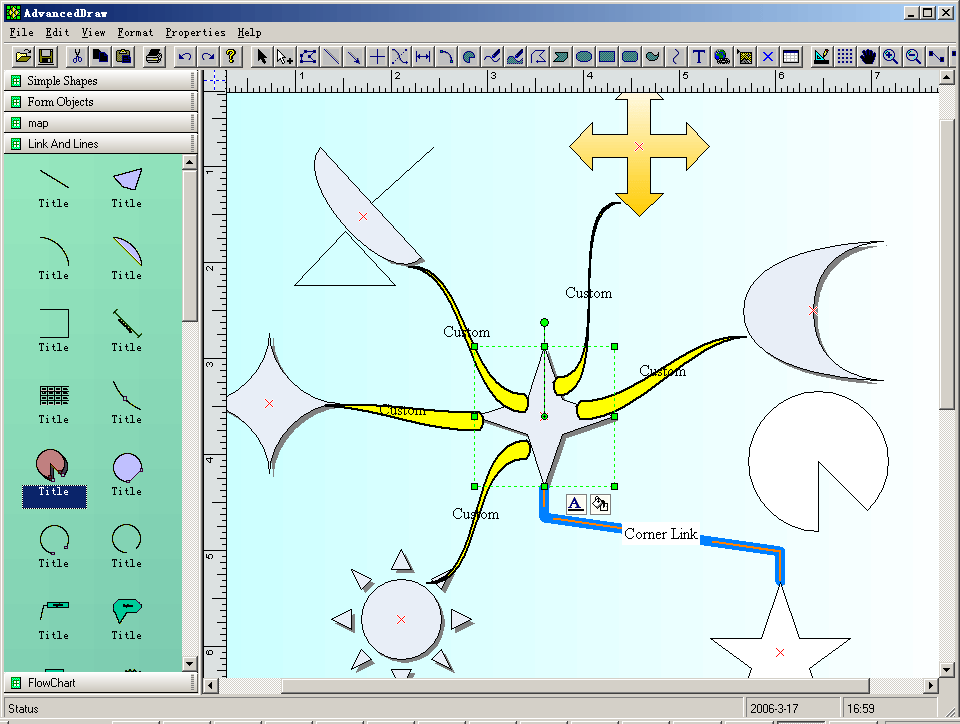
 Figure 1:Allows
you to create flow charts, vector drawings, raster images and more with
the ability to include hyperlinks and various shading and coloring
effects. You can group objects together, include images and text, link
them together and apply custom drawing effects to create charts similar
to Microsoft Visio, Adobe Illustrator, and CorelDRAW.
Figure 1:Allows
you to create flow charts, vector drawings, raster images and more with
the ability to include hyperlinks and various shading and coloring
effects. You can group objects together, include images and text, link
them together and apply custom drawing effects to create charts similar
to Microsoft Visio, Adobe Illustrator, and CorelDRAW.
Figure 2:By purchasing the product you
receive the diagram component
plus full source code which you are licensed to modify and thus
customize according to your needs.
At the developer's discretion, a
powerful range of end-user editing capabilities can be enabled.
The full source to UCanCode ActiveX
Controls will be included in the E-XD++ MFC graphics product.
Figure 3: In addition to extending the
functionality of E-XD++ MFC Class Library,
UCanCode ActiveX Controls
also act as a layer of abstraction for the Windows GDI. This layer shields
you from low-level GDI details so you can concentrate on creating an
application design. Because the UCanCode ActiveX Controls
extend XD++ MFC Class Library, you can seamlessly integrate UCanCode
ActiveX Controls Diagram Component into your Visual Basic programs,
Visual C++ programs, browsers, and anywhere an ActiveX control is
allowed.. However, this does not preclude you from customizing the
behavior of any of the UCanCode ActiveX Controls Diagram
Component.
Figure 4: UCanCode ActiveX Controls
FlowChart
Component enhance the XD++ MFC classes that thinly
encapsulate the Windows GDI API by supporting interactive graphics that
support high-level drawing actions such as alignment , copying, or
sizing objects.
You can develop any application that
includes a drawing surface and interaction with graphical objects
quickly and effectively using UCanCode ActiveX Controls Diagram
Component.
Here are some of the possibilities:
- Desktop Publishing --
Like
Microsoft PowerPoint, CorelDraw
CAD Application
-- Like
AutoDesk AutoCad
Classic Flowcharts
Application
Work Flow Application
Development Application
-- Like Microsoft Visual C++ Resource
Editor
Control Flow
Applications
MultiMedia Author
Application
-- Like Dazzler
CASE software
-- Like Visual CASE
Form Editor
Reliability and performance are
extremely good. This control is based on a mature body of Visual C++
source code that has been under development for over 4 years and is
being used in several products by multiple companies.
 1.
Over 130 Default shapes that can be used for building your own
application.
2.
With shape designer you can create any kind of composite shapes that
supports drag and drop.
3.
UCanCode ActiveX ships a Visio 2007 like toolbox window.
4.
UCanCode ActiveX has the world leading drawing, editing , layout features.
5.
UCanCode ActiveX supports full control of printing for any drawing.
6.
Export any drawing to emf, bitmap or wmf files.
7.
Add as many connect points to any nodes.
8.
Create links between two connect points (Port).
9.
Navigate the links or nodes that linked.
10.
Multiple records Label print component or Report print.
11.
Adding, Changing or setting User Property Value.
12.
Running time and Design Mode.
13.
Why you need UCanCode ActiveX Component?
14.
Download UCanCode ActiveX Control before you buy?
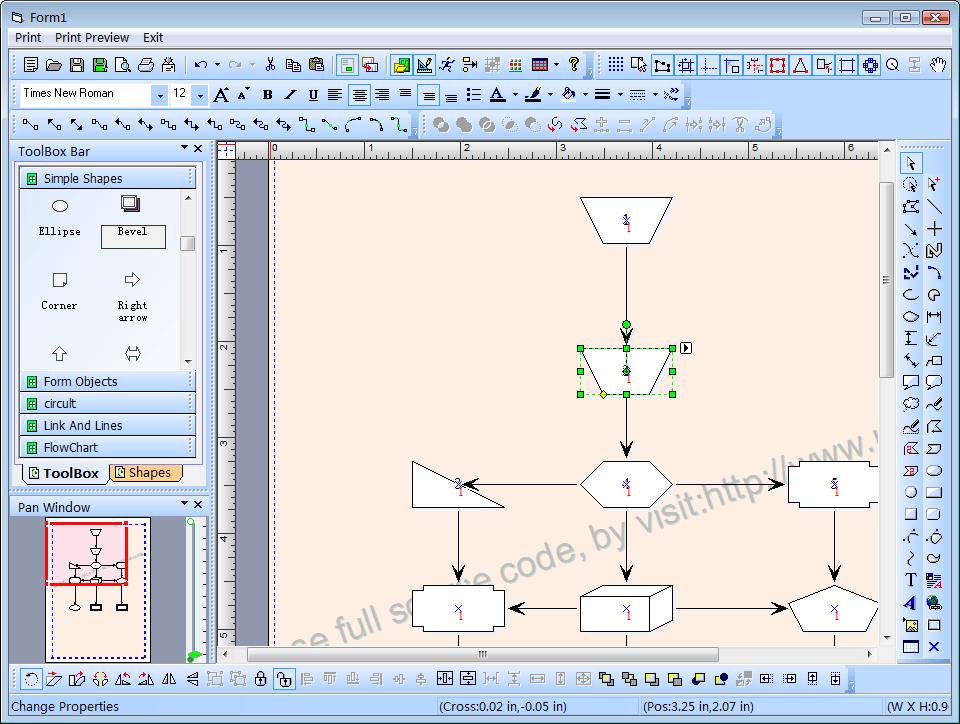
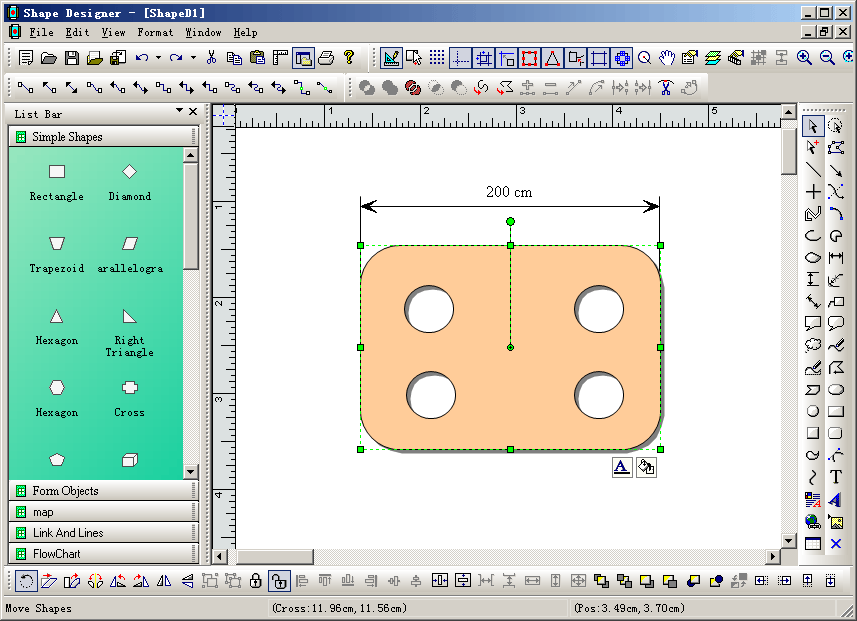
Screen Shots:
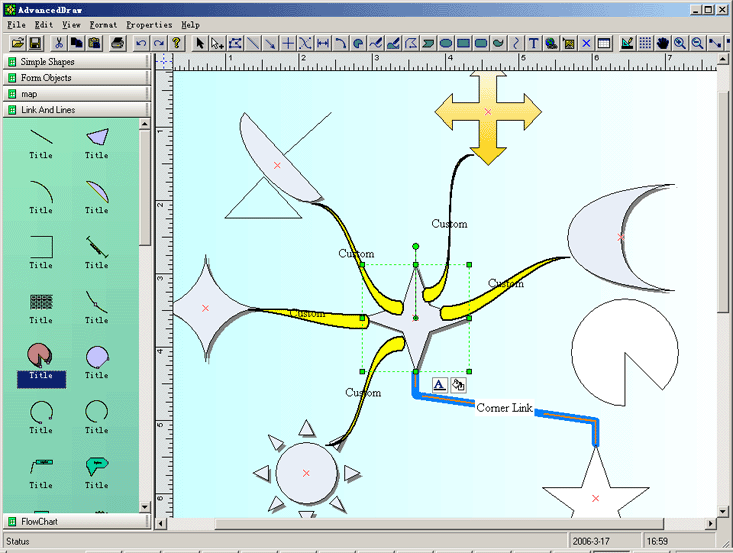
(UCanCode Draw ocx sample, Visual Basic)
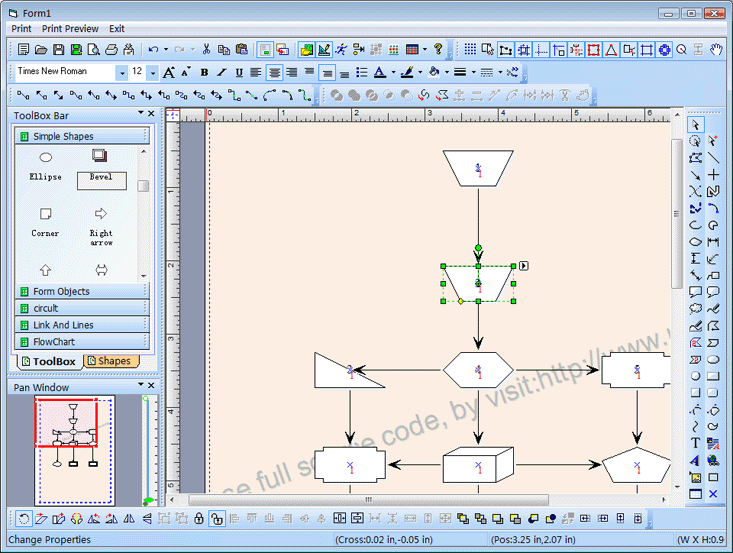
(Advance UCanCode Diagram OCX
ActiveX Control)
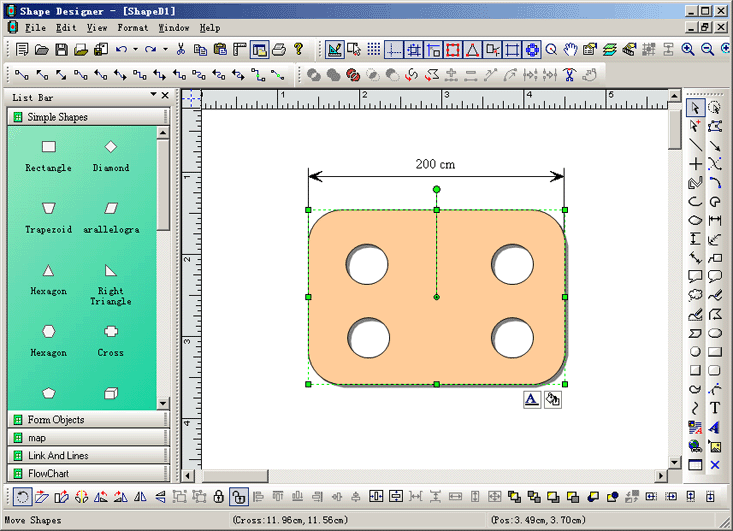
(Shape Designer for UCanCode ActiveX Controls)
Below is the full features about
UCanCode ActiveX
Component
Full source code
UCanCode ActiveX Components are completely written in Microsoft Visual
C++. Source code, which you get for free, has many advantages:
You can further develop the
product;
Complete control of the product's
programming quality;
Flowcharting
This functionality enables
UCanCode ActiveX Components to become a powerful flow charting
tool. The link object is a special object that has the sole purpose of
connecting shapes together. Since it is a real shape, you can set
properties for it:
- Arrowheads, style and size;
Line color, thickness and style;
Shape name, for easier
identification.
Object links in flowcharting:
- Rectilinear and direct object
links;
Ability to edit nodes and links
through source code;
Object avoidance: auto-routing
algorithm routes the connecting line around other objects;
Adjusting the position of the
first and the last point of a link.
Vector drawing
UCanCode ActiveX Components come
with a set of predefined shapes, such as: Arcs; Dimension line; Rectangle;
Curve; Ellipse; Line; Freeform polygons; Text; Diamond; Triangle; Right
triangle; Parallelogram; Trapezoid; Hexagon; Octagon; Plus sign; Star; Pentagon;
Left arrow; Scribble; Etc.
You can subject shapes to:
Grouping/Ungrouping;
Moving;
Rotating;
Flipping;
Reversing, etc.
Hyperlinking
Simply add hyperlinks to each shape and drawing page. Through a hyperlink
you can jump to another UCanCode ActiveX Components
drawing, another file (.DOC, .XLS, etc.), or your Web site for example!
Raster imaging tools
Several raster imaging tools are @ your disposal:
- Filling shapes with patterns,
textures, pictures and with all standard colors;
Text editing
UCanCode ActiveX
Components has a variety of text manipulating devices:
- Plain text: This device is
convenient when drawing titles, logos, or other short text you want to
manipulate, i.e. stretch, flip, custom-fill, etc.;
Text boxes: This device is
suitable for manipulating large blocks of formatted text;
Displaying and editing text in
composite shape;
Object model
The object model of
UCanCode ActiveX Diagramming Components are improved and
therefore far more logical and intuitive. It allows you to manipulate
shapes and events quickly and easily.
Workspace display
A variety of properties are available to set the way you want the drawing
workspace to be displayed with:
Grid;
Paper background;
Scroll bars;
Printing
Several useful printing options are @ your disposal:
- UCanCode ActiveX Component
prints the whole drawing on canvas and auto split pages;
Specifies print settings such as
margins, orientation, paper size, etc.;
Complete control of printing,
Print Preview and PrinterSetup dialog box.
Other features
- Unlimited Undo-Redo capability;
Zooming;
Panning;
Rotating
Dynamic re-ordering and object
grouping;
4 C++ and VB sample projects with
complete source code.
Compatibility
UCanCode ActiveX Controls are compatible with a wide range of development
languages and platforms, including:
MS Visual C++,
.NET 4.0 Window Forms;
MS FoxPro for Windows;
MS Visual
Studio 2010, MS Visual Studio 2013, Visual Studio 2015,
Visual Studio 2017,
Visual Studio 2019, Visual Studio 2024All windows platforms (32 bits, 64 bits)
Borland C++Builder;
Borland Delphi;
Any other 32-bit programming
environments that support ActiveX components.
Trial Software

• UCanCode ActiveX Diagram
Component (15 Mb)
Try
EVERY feature before you purchase it
In the download section you can find the
trial version of
UCanCode ActiveX Diagramming Component. All our research
show that a fully-functional demo is a decisive element for most of
developers. So check for yourself if UCanCode ActiveX Diagramming
Components are what you were looking for. The only difference
between the trial and release version is the presence of nag screens.
Licensing
UCanCode ActiveX
Component is licensed per number of developers'
machines i.e. one software license is required per developer's
machine.
All
UCanCode ActiveX
Components are royalty-free which means re-distribution with your
application does not require any additional fees.

 UCanCode build to meet
your specific functional requirements of the ActiveX control?
UCanCode build to meet
your specific functional requirements of the ActiveX control?
"UCanCode provides special
customized services, through this service, you can customize to meet your
specific needs in particular the ActiveX, we can in a very short time to your
needs, your functional requirements will now send UCanCode.
"
More about Product Information:
Commands
Properties
Dialog
View
Arrows
Windows
General
Q & A
|
|





 E-XD++Visual
C++/ MFC Products
E-XD++Visual
C++/ MFC Products





 Visual Studio.NET,
 Visual C++,
 Visual Basic 6.0,
 Borland Delphi,
 Borland C++ Builder,
 Microsoft Java